Content Management
Vectis includes a lightweight CMS for managing static pages, navigation, and media files. Content is stored as structured JSONB blocks and rendered dynamically on the storefront.
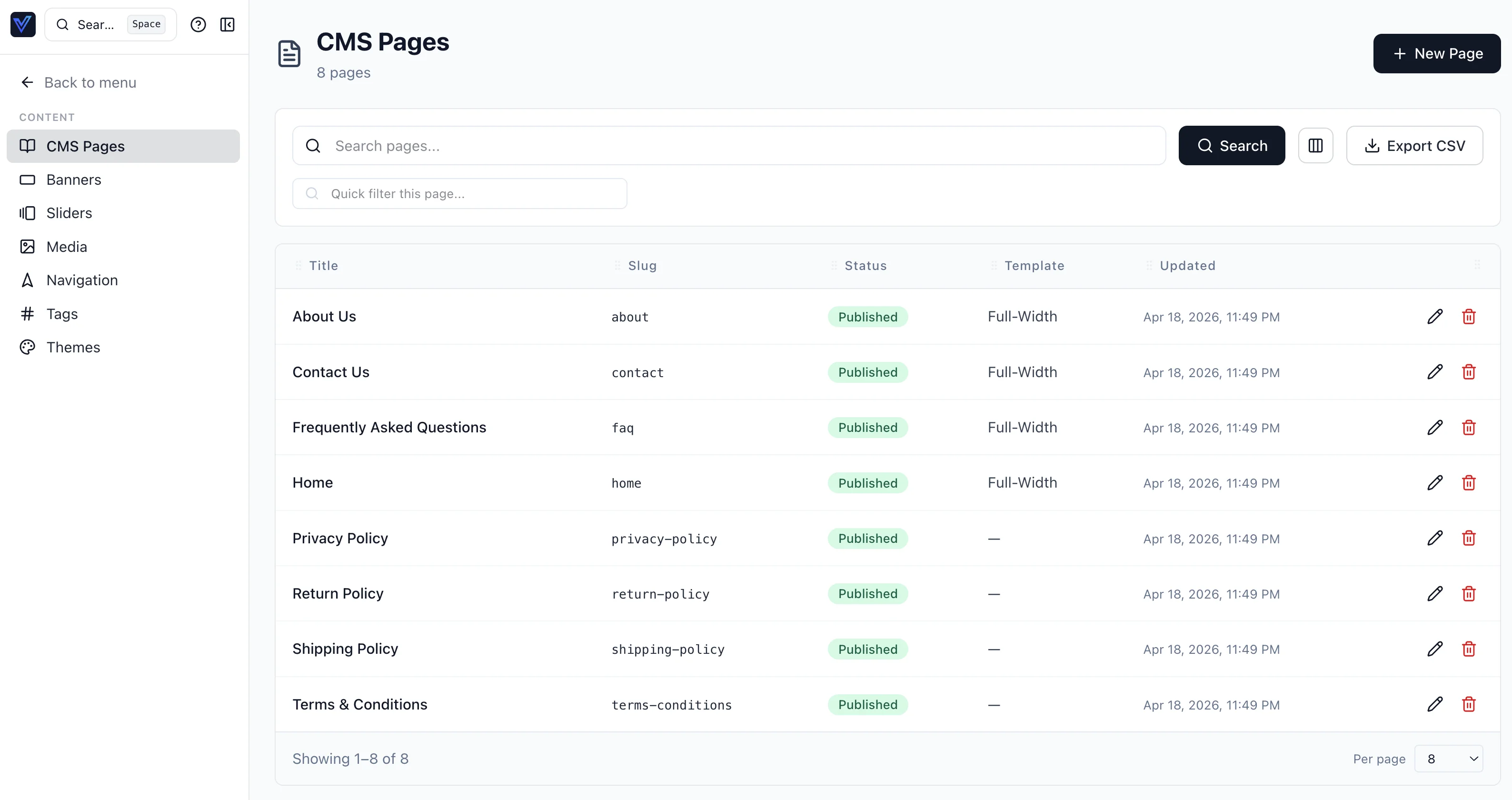
Pages
How Pages Work
Each CMS page consists of:
- Title — the page heading.
- Slug — the URL path (e.g.,
/aboutor/policies/returns). - Status — draft or published. Only published pages are visible on the storefront.
- Content blocks — an ordered array of JSONB blocks that make up the page body.
The storefront uses a dynamic [slug] route that looks up the page by its slug and renders the content blocks in order.
Content Blocks
Content is stored as structured blocks rather than raw HTML. Each block has a type and data payload:
| Block Type | Purpose |
|---|---|
heading | Section heading (h2–h6) |
paragraph | Rich text paragraph |
list | Ordered or unordered list |
hero | Hero banner with heading/subheading and optional CTA |
cta_button | Call-to-action button |
columns | Multi-column layout of nested blocks |
accordion | Collapsible sections |
divider | Horizontal rule |
spacer | Vertical spacing |
stats | Numeric stat callouts |
feature_grid | Grid of feature cards |
category_list | Storefront category listing |
product_grid | Grid of products |
Tip
The block-based format keeps content structured and portable. It also makes it straightforward to build alternative renderers (e.g., mobile app, email) from the same content data.
Seeded Policy Pages
A fresh Vectis installation includes eight pre-seeded pages:
| Page | Slug | Purpose |
|---|---|---|
| Home | home | Storefront homepage |
| About Us | about | Company background |
| Contact Us | contact | Company contact information |
| FAQ | faq | Frequently asked questions |
| Shipping Policy | shipping-policy | Shipping timelines and methods |
| Return Policy | return-policy | Return and refund procedures |
| Privacy Policy | privacy-policy | Data handling and privacy |
| Terms & Conditions | terms-conditions | Legal terms and conditions |
These pages contain placeholder content. Edit them in the admin to match your business policies.
Warning
Do not delete the seeded policy pages — the storefront footer links to them. Edit the content instead, or update the footer navigation if you change slugs.
Navigation
Navigation menus are managed in the admin and consumed by the storefront:
- Header navigation — primary site menu with links to categories, pages, or custom URLs.
- Footer navigation — secondary links (policies, contact, social media).
Each navigation item has a label, URL (internal page slug or external URL), and sort order. Navigation items can be nested one level deep for dropdown menus.
Media Management
Vectis stores uploaded files in S3-compatible object storage (MinIO in development, S3 or equivalent in production).
Uploading Media
From Content → Media in the admin:
- Upload images, PDFs, or other files.
- Each file gets a unique URL served through the backend.
- Use uploaded images in CMS page content blocks or product descriptions.
Supported Formats
- Images — JPEG, PNG, WebP, GIF, SVG
- Documents — PDF
- Size limit — configurable per deployment (default 10 MB)
Note
Media files are served through the API with appropriate caching headers. For high-traffic storefronts, place a CDN in front of the media endpoint.
Block Templates
Re-usable building blocks. A Block Template has the same JSONB payload as a content block but is stored once in the database and embedded into pages via a template_block reference. Editing the template updates every page that embeds it.
Templates also support translations via the ProductTranslation-style overlay (locale → payload override). Missing translations fall back to the base template. The block cache invalidates per locale shard so a Spanish translation update doesn't bust the English cache.
The cache contract:
| Concept | Key |
|---|---|
| Per-block cache | tag_key(block_id, locale) |
| Per-page resolved overlay | overlay_key(page_id, locale) |
| TTL | 30 minutes default, 60 seconds for price-bearing blocks |
| Invalidation | Redpanda vectis.cms.block_invalidated.v1 |
Current Limitations
The CMS is intentionally lightweight. It covers common content needs but does not include:
- Drag-and-drop page builder — planned. Currently, pages are edited through the structured block editor in the admin.
- Versioning — pages do not have revision history yet. Save carefully.
Scheduled publishing is supported: a page carries a publish_at field and the schedule_page mutation sets the page to scheduled for publication at a future time.
Admin Panel
From Content in the admin:
- Pages — create, edit, and publish CMS pages. Manage content blocks in the structured editor.
- Navigation — configure header and footer menus with drag-to-reorder.
- Media — upload and manage files. Copy URLs for use in content blocks.
- SEO — each page supports meta title and meta description fields for search engine optimization.