Affiliates
Vectis ships a full affiliate program: application review, commission rules with multi-level precedence, append-only earnings ledger, and CSV-first payouts with a strategy hook for ACH providers.
The admin UI lives at Marketing → Affiliates and is split into three sub-pages:
| Sub-page | Purpose |
|---|---|
| Approvals | Review, approve, suspend, or terminate affiliate accounts |
| Commissions | Define and order the rules that set commission rates |
| Payouts | Review and process periodic payouts (manual CSV by default) |
Approvals
Affiliates apply from the storefront, uploading a W-9 or W-8 tax document and agreeing to the program terms. Applications land in Approvals in pending status for staff review.
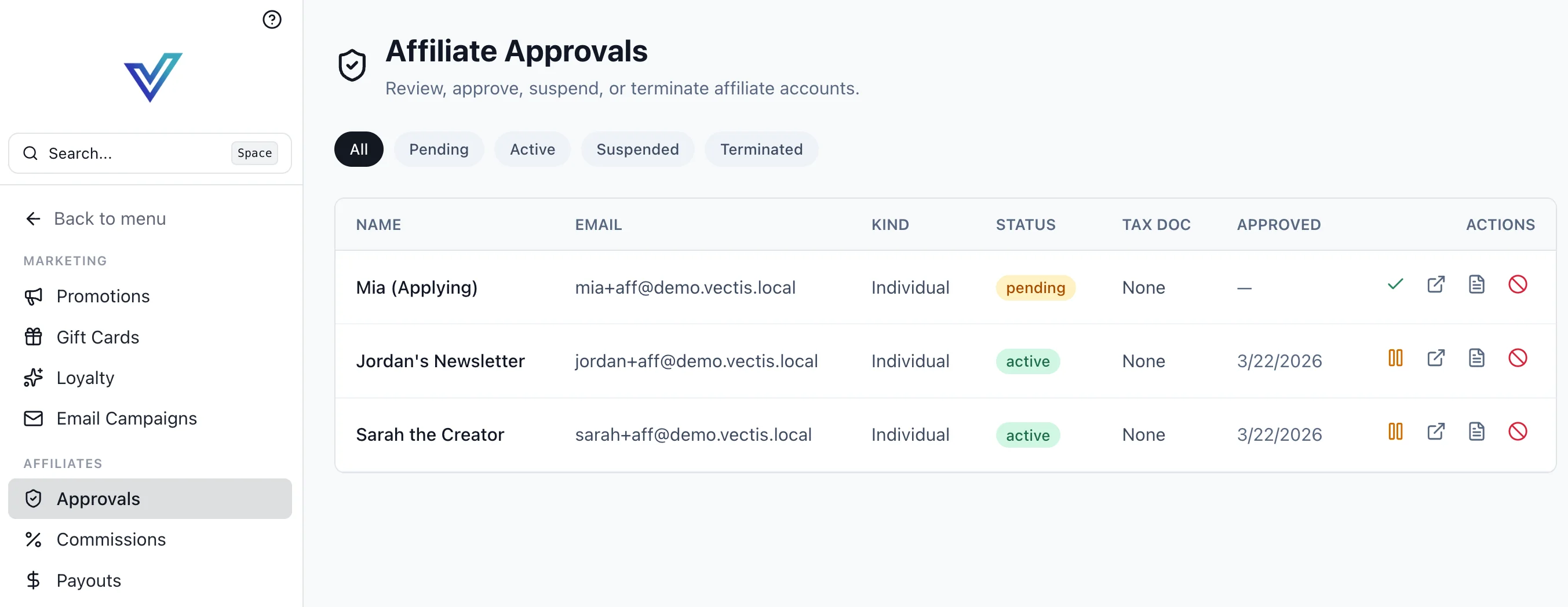
Each row surfaces the affiliate's name, email, kind (individual or org), current status, tax-doc state, and approval date. Row actions:
- Approve (✓) — moves
pending → active; the affiliate can start earning referrals. - Open profile — jumps to the affiliate's detail view for commission overrides and member management.
- Review document — opens the uploaded W-9 / W-8 for verification.
- Suspend / Terminate (⛔) — stops new attributions immediately; prior ledger entries are preserved.
Status lifecycle:
graph LR
    A[pending] -->|approve| B[active]
    B -->|suspend| C[suspended]
    C -->|reinstate| B
    B -->|terminate| D[terminated]
    C -->|terminate| D
Tax documents are required before payout
An affiliate can be active without a tax doc on file, but payouts will be blocked until the doc is uploaded and marked verified. The Tax Doc column on the approvals list shows the current state.
Commission Rules
Commissions are rate records with a scope and an effective window. When an order is attributed, the resolver walks a fixed precedence chain and uses the first rule that matches.
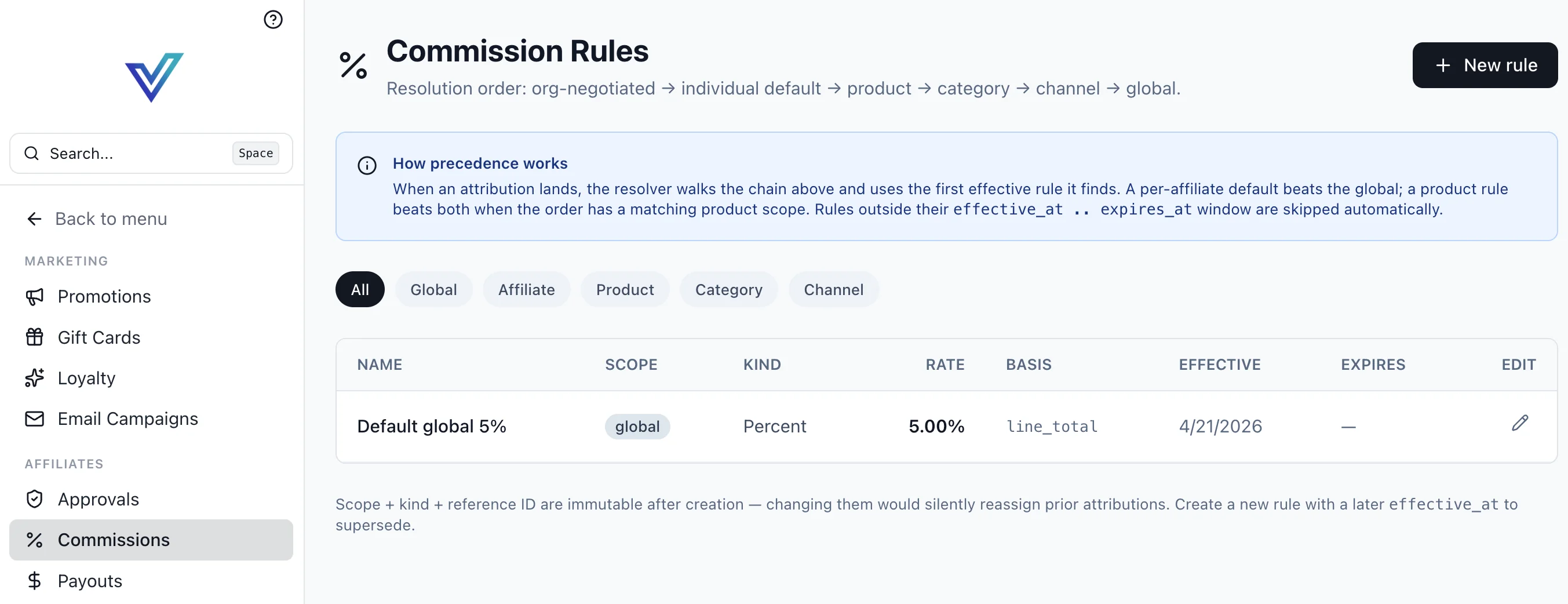
Resolution order
A per-affiliate default overrides the global default. A product rule overrides both when the order contains a matching product. Rules outside their effective_at .. expires_at window are skipped automatically.
Rule fields
| Field | Description |
|---|---|
name | Human-readable label |
scope | global, affiliate, product, category, or channel (there is no org scope value — org-negotiated rates are resolved via the affiliate_orgs.negotiated_commission_rule_id FK, which takes precedence) |
scope_ref_id | ID of the scoped entity (null for global) |
kind | percent, flat, or tiered |
rate | Decimal rate — 0.0875 means 8.75% for percent rules |
basis | order_subtotal, line_total, or gross_margin |
effective_at / expires_at | Time window; rule is inactive outside of it |
Scope + kind + reference are immutable
Once a rule is created, changing its scope, kind, or scope_ref_id would silently reassign prior ledger entries. Create a new rule with a later effective_at to supersede it.
Tiered rules
Tiered rules carry a tiers array (JSONB) of { min_qty, rate } or { min_total, rate } steps. The resolver picks the highest tier the attributed order satisfies.
Commission Ledger
Every attributed order writes rows to the append-only commission_ledger. Entries are never mutated — corrections ship as reversing entries. This guarantees that historical payouts reconcile exactly against the ledger.
A ledger row captures:
affiliate_id,order_id,rule_idcommission_amount(Decimal 14,2, in the affiliate org's base currency)status—pending,approved,paid,reversedattributable_amount— the basis amount the rate was applied to- A snapshot of the rule (kind, rate, basis) at attribution time
Payouts
Payouts sweep approved ledger entries into period batches. The default rail is manual CSV — the ext_payout_csv strategy produces a manifest file that can be fed to an ACH tool.
Payout lifecycle
graph LR
    A[pending] --> B[approved]
    B --> C[processing]
    C --> D[paid]
    C --> E[failed]
    E --> B
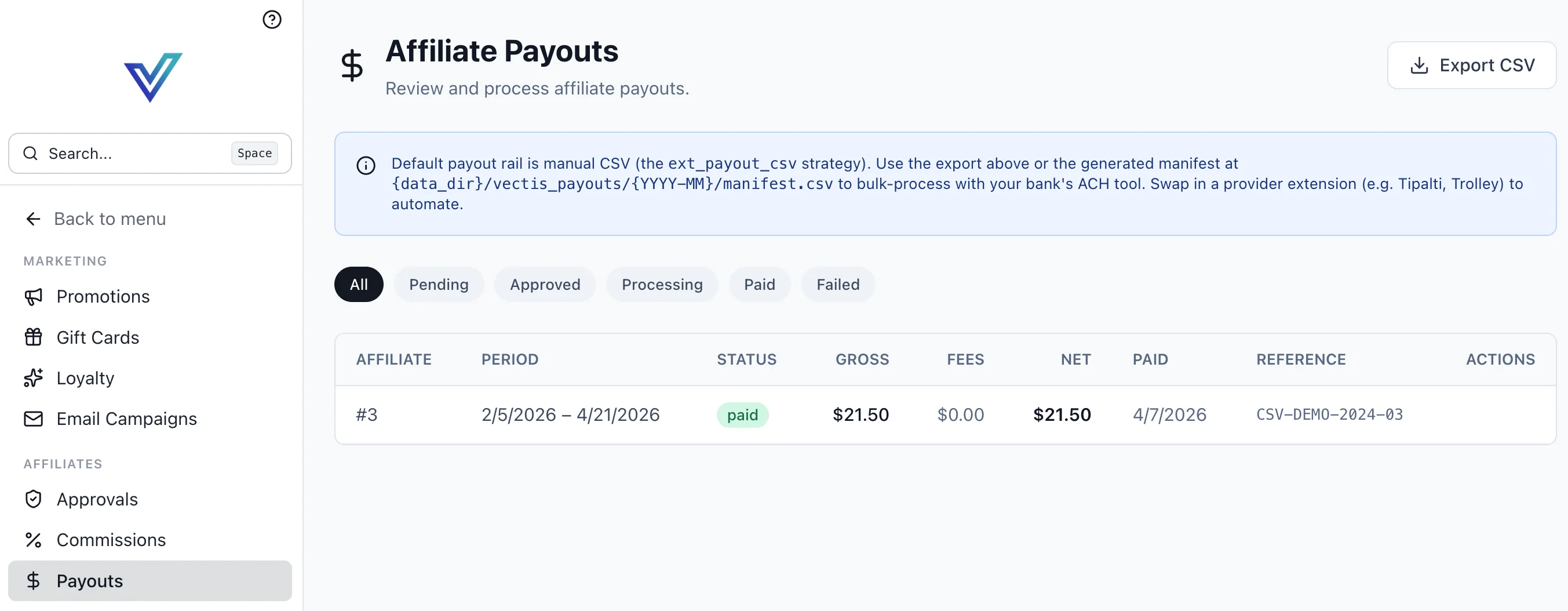
Each payout row shows the affiliate, the covered period, status, gross, fees, net, paid date, and an external reference. Export CSV downloads the manifest for the current filter.
Default CSV rail
The manual rail writes the manifest to:
Columns are affiliate identifier, gross, fees, net, period, and a reference token. Swap in a provider extension (e.g. Tipalti, Trolley) to automate — see Extensions.
ACH file formats
The manifest format is deliberately simple CSV so you can re-format to NACHA or a provider-specific schema in a spreadsheet or extension. The reference token flows back into the ledger on payment confirmation.
Attribution
Clicks on an affiliate referral code drop a ReferralClick row. When that visitor later completes a qualifying checkout, a ReferralAttribution row is written linking order → click → affiliate. The default attribution window is configurable per channel.
Multi-Factor Fraud Guard
Attributions are evaluated against a multi-factor fraud guard before commission posts to the ledger. Signals scored:
- Click → conversion latency — too-tight or too-stale relative to the program's expected curve
- IP correlation — buyer IP matches the affiliate's last-known login or referrer IP
- Account self-attribution — buyer's billing email matches an affiliate-managed account
- Velocity — abnormal click density from a single source
When the guard fires, the attribution enters the Affiliate Review Queue (admin /affiliates/approvals) with suspicious status (the ReferralAttribution.status values are pending, confirmed, reversed, and suspicious). The affiliate sees the order on their dashboard but the commission is held until staff approves or denies via review_suspicious_attribution. The fraud signals are recorded on the attribution itself for appeal.
Per-channel thresholds for each signal live under Settings → Affiliates → Fraud Guard.
Affiliate Self-Service Portal
The storefront ships a /affiliates/* portal so affiliates can manage their own status:
| Route | Purpose |
|---|---|
/affiliates/apply | Submit the affiliate application + tax docs |
/affiliates/dashboard | Daily click/commission summary + alerts |
/affiliates/commissions | Ledger view (status, payout reference) |
/affiliates/payouts | Payout history with downloadable manifests |
/affiliates/referral-codes | Manage referral codes / shortlinks |
/affiliates/settings | Payment preferences, notification settings |
When the AWIN integration is installed (carrier-style extension), the dashboard surfaces AWIN-sourced clicks and reports alongside Vectis-native attributions.
Developer Reference
Affiliate internals live in backend/vectis/modules/affiliate/:
models.py—CommissionRule,AffiliateOrg,Affiliate,CommissionLedger,Payoutservices.py—AffiliateService,CommissionRuleService,CommissionService,PayoutService,AttributionServicestrategies.py— payout provider strategy interface (ext_payout_csvis the built-in)workflows.py— Temporal workflows for periodic payout sweeps
The GraphQL surface (mutations to approve/suspend, list ledger entries, generate payouts) is documented in the API Reference.