Orders
Orders are the core transaction record in Vectis. Every completed checkout produces an order that tracks line items, pricing, tax, shipping, and fulfillment status.
Checkout Flow
The checkout pipeline runs these steps in sequence:
graph LR
    A[Cart] --> B[Promotions Evaluated]
    B --> C[Shipping Calculated]
    C --> D[Tax Calculated]
    D --> E[Payment Processed]
E --> F[Order Created]- Cart finalized — all line items, quantities, and the shipping address are set.
- Promotions evaluated — discount rules and coupon codes are matched. Allocations are computed per line item.
- Shipping calculated — carrier strategies return rates for the selected method.
- Tax calculated — all registered tax strategies run; per-line tax lines are written.
- Payment processed — the payment strategy authorizes or charges the payment method based on the configured capture mode.
- Order created — the cart converts to an order with immutable line-level snapshots of price, tax, and discount.
Order State Machine
Orders follow a configurable state machine. The default EmpireOrderProcess defines these states:
| State | Meaning |
|---|---|
Created | Order record exists, initial state |
PendingApproval | B2B order awaiting approval from an authorized approver |
AwaitingPayment | Offline/terms payment pending |
AwaitingFulfillment | Payment captured or authorized, ready to pick/pack |
ManuallyVerifyPayment | Staff must manually confirm payment |
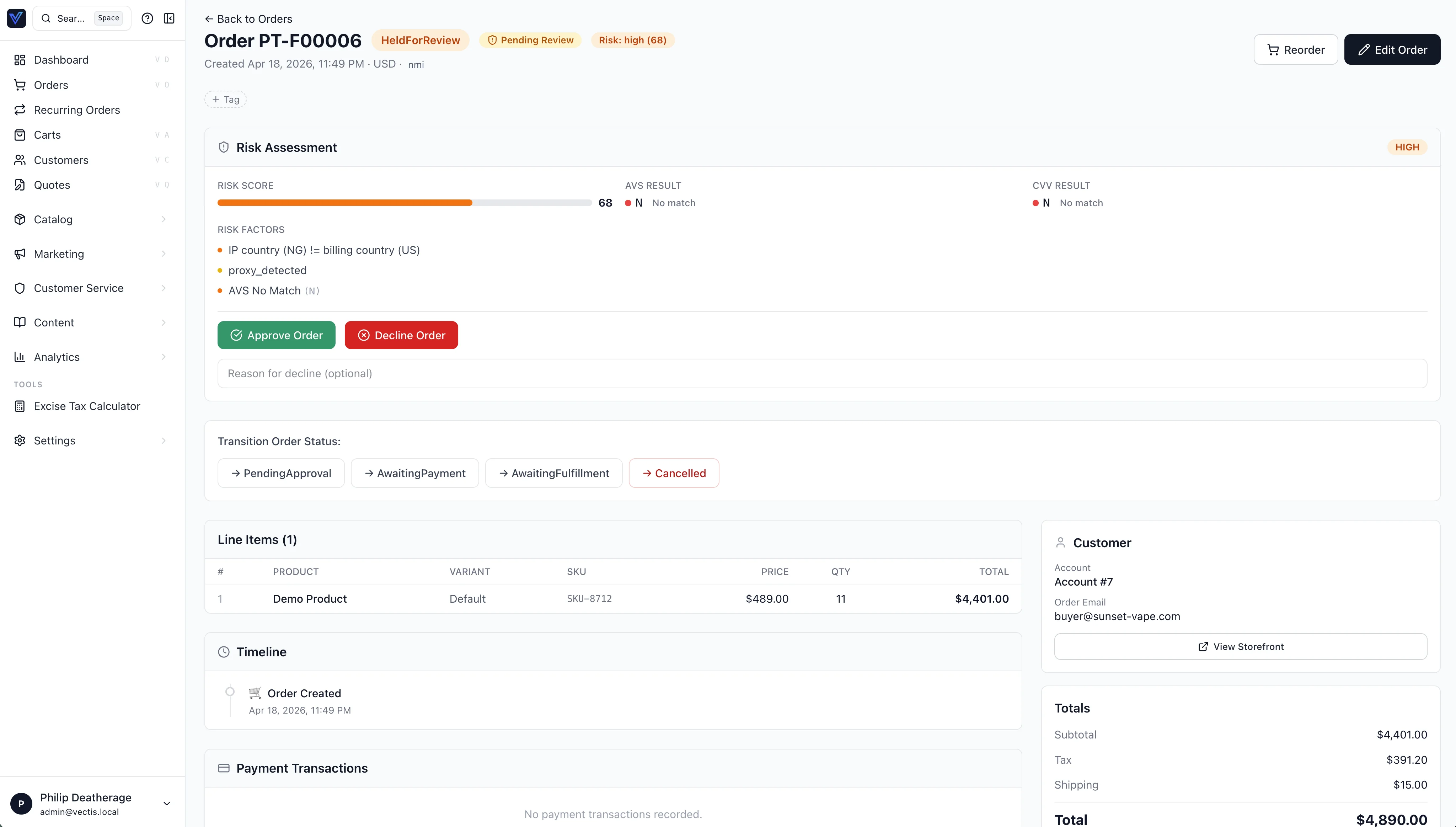
HeldForReview | Payment flagged by gateway fraud filters (see Payments → Fraud) |
PartiallyFulfilled | Some shipments dispatched |
Fulfilled | All shipments dispatched |
PartiallyFunded | B2B best-effort tender mode: a partial capture landed; buyer pays the gap to move forward |
PaymentCascadeExhausted | B2B: the tender cascade ran out of options; an approver re-curates or abandons |
Cancelled | Order cancelled — triggers automatic void/refund |
Refunded | Refund processed for captured payments |
Custom states
The state machine is strategy-defined. Deployments can add states like Backordered or PartiallyShipped without modifying core code.
Transitions
Transitions are guarded — a Fulfilled order cannot jump back to Created. Side-effects (void/refund, emails, Redpanda events, ERP sync) fire on each transition.
Key automatic behaviors:
- Cancel → auto void/refund: Transitioning any order to
Cancelledautomatically voids authorized transactions or refunds captured ones. - Refund → auto refund: Transitioning from
FulfilledtoRefundedautomatically refunds all captured transactions. - Fraud release → AwaitingFulfillment: Releasing a fraud hold transitions from
HeldForReviewtoAwaitingFulfillment.
Order Totals
Every order stores five monetary totals:
| Field | Description |
|---|---|
subtotal | Sum of (unit_price × quantity) for all lines |
discount_total | Sum of all promotion allocations |
tax_total | Sum of all tax lines across all order lines |
shipping_total | Shipping cost after any free-shipping promotions |
grand_total | subtotal - discount_total + tax_total + shipping_total |
Order Modification
Orders in an editable state with payment_status="authorized" can be modified:
- Add lines — specify a variant ID and quantity.
- Remove lines — remove existing line items.
- Update quantities — change the quantity on existing lines.
When an order is modified:
- Totals are recalculated (subtotal, grand total, base amounts).
- The existing authorization is voided.
- A new authorization is placed for the updated grand total.
- An
order.modifiedevent is recorded.
This is available to admins and B2B buyers via the modifyOrder mutation. Only authorized (not captured) orders can be modified.
Warning
Once payment is captured, the order cannot be modified. Refund and re-create instead.
Admin Order Creation
Staff can create orders directly from the admin panel:
- Navigate to Orders → Create Order.
- Select an account and channel.
- Add line items by variant ID.
- Set addresses, shipping, and notes.
- Choose a saved card or payment method with capture mode.
See Payments → Admin Order Creation for details.
B2B Features
Vectis orders support several B2B-specific capabilities:
- PO numbers — buyers attach a purchase order reference at checkout. The PO number appears on invoices and in admin search.
- Approval workflows — orders from accounts with approval rules enter a
PendingApprovalstate. Authorized approvers confirm or reject via the admin panel or API. - Payment terms — accounts configured with net-30, net-60, or custom terms create orders without immediate payment. The order records the terms and due date.
- Location-scoped cards — saved payment methods can be scoped per location for B2B accounts with multiple sites.
Multi-Currency
Orders store dual amounts for every monetary field using a base_ prefix alongside the plain field name:
- Plain field (e.g.,
subtotal,grand_total) — the transacted amount, in the currency the buyer paid in (e.g.,100.00 MXN). base_field (e.g.,base_subtotal,base_grand_total) — the equivalent in your base currency (e.g.,5.88 USD).
The exchange rate is locked at checkout time and stored on the order. Subsequent rate fluctuations do not affect existing orders.
Note
The base currency is set per channel. All reporting and accounting queries can use base amounts for consistent aggregation.
Fraud Handling
Orders flagged by gateway fraud filters (Authorize.net FDS) enter the HeldForReview state. The admin can:
- Release the hold — approves the transaction and moves the order to
AwaitingFulfillment. - Cancel the order — voids the held transaction.
See Payments → Fraud Filter Handling for the full workflow.
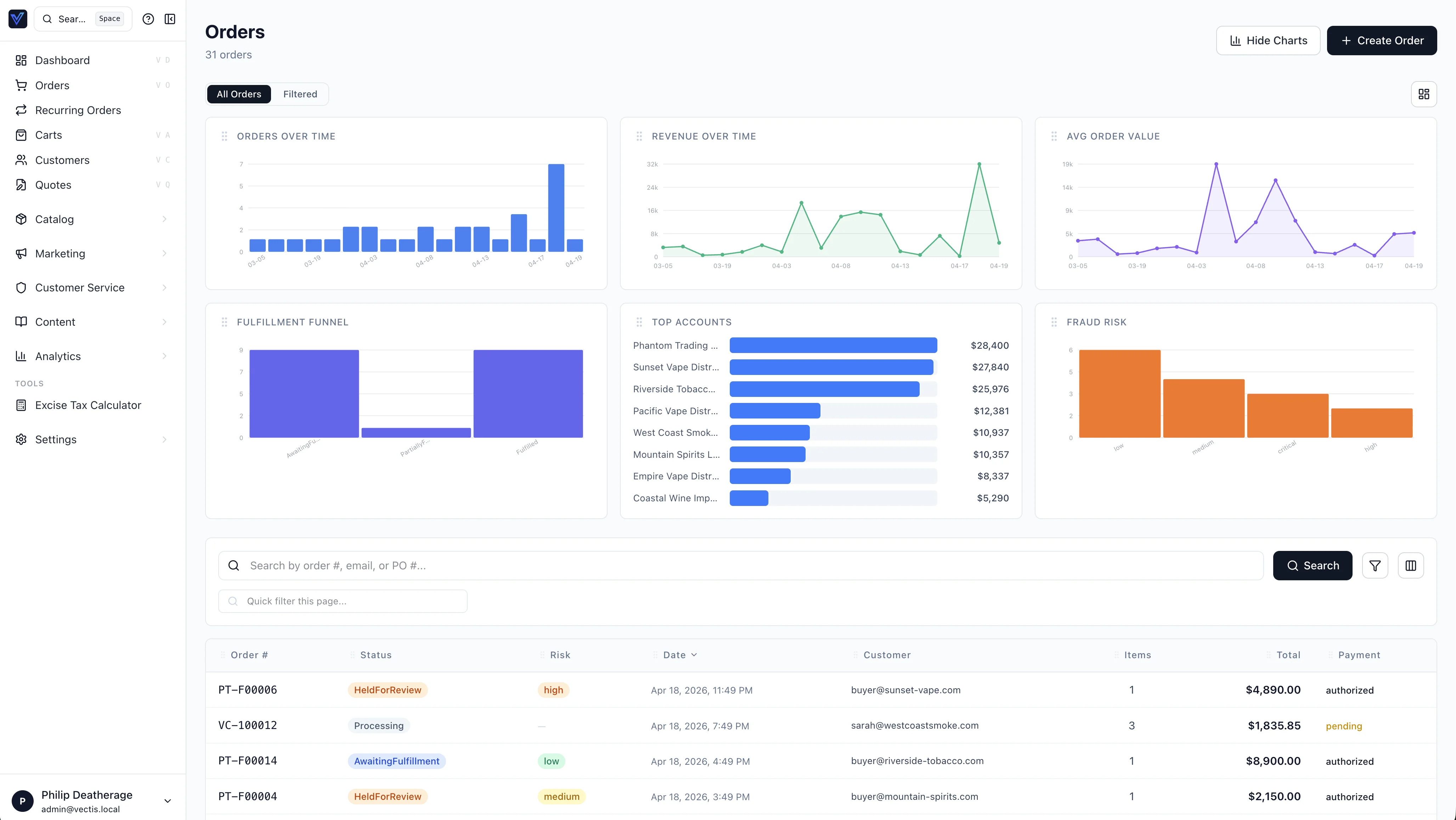
Admin Panel
From Orders in the admin panel you can:
- Search and filter by status, date range, account, PO number, or order ID.
- View order detail — line items with per-line tax breakdown, discount allocations, and fulfillment status.
- Transition status — move an order to its next valid state. Invalid transitions are blocked by the state machine.
- View payment transactions — authorizations, captures, voids, refunds with gateway details. Capture authorized transactions, void, or refund directly from the transaction panel.
- Release fraud holds — approve transactions flagged by gateway fraud filters.
- Modify orders — add/remove/update line items on authorized orders with automatic reauthorization.
- Create orders — build orders from scratch for B2B customers with saved card charging.
- Add internal notes — staff-only notes attached to the order timeline.
Warning
Transitioning an order to Cancelled triggers automatic void or refund of all open payment transactions. This action cannot be undone.
Reissue
For orders that ship via an external ERP / WMS, you can reissue an order from the admin order detail. Two reasons trigger a reissue:
- No prior shipment — the original order never reached the warehouse poller (e.g., aborted, lost, never processed). A new linked order is created with
is_reissue=true,reissued_from_order_idpointing at the original, and areissue_reasoncapturing why. - Undelivered shipment — a previously created shipment never arrived. A new linked order ships fresh inventory; the original order is marked for refund/credit reconciliation.
Reissue always creates a new order rather than modifying the original, so ERP pollers consistently pick up the new record. The original order's status is unchanged; the linkage is visible from both directions in the admin order detail.
External Fulfillment Handoff
When the order is handed off to an external system (ERP, 3PL), the receiver acknowledges via the acknowledgeOrderExternalHandoff(orderId, externalReference) mutation. On ack:
Order.external_handoff_acknowledged_atandexternal_handoff_referenceare stamped- Internal inventory holds are released — the ERP becomes the system of record
- The order list shows a "Handed off to {reference}" badge
If the ERP fails to acknowledge in time, the order surfaces in the Workflow Faults inbox so an operator can intervene.
Inventory Risk Flag
When fulfillment detects an oversold condition, Order.inventory_risk_flag is set on the order. Orders with the flag set show a badge in the order list and can be filtered with the orders(inventoryRiskOnly: true) query argument. Resolving the flag is operator-driven — clear it via clearProductBackorders(productId) once the underlying inventory state is corrected.
Reorder Resilience
Each order line snapshot stores the full packaging context — package_id, slug, label, multiplier, and the converted eaches — on OrderLineItem.product_snapshot.unit. When the buyer reorders:
- The slug + multiplier are used to find the current package on the variant
- If the original package no longer exists, the line falls back to canonical eaches and is marked
unit_changed=trueon the new cart line - The storefront shows a "Package changed" interstitial so the buyer can confirm
OrderLineItem.tracking_enabled_at_checkout is also captured at order-place time so fulfillment uses the tracking flag as it was when the order placed, not the live Product.track_inventory (which may have flipped since).
B2B Cart → Order Approval
The four-phase workflow's state lives on the Cart, not the Order:
Cart.cart_approved_grand_total— the price the approver saw at cart-approval time; the place-order gate refuses if the live price drifted (pricing-drift gate)Cart.statuscarriescart_approved_blocked_inventorywhen inventory revalidation at place-order time turns up an oversell; the cart returns to the buyer for re-curationCartRejectionEventaudit rows capture every rejection in the cart approval / payment approval phases
See vectis/MINIFORGE.md for the protocol details and the GraphQL overview for the mutation surface (submitCartForApproval, approveCartPhase, approvePaymentPhase, recurateCascade, …).